1/5
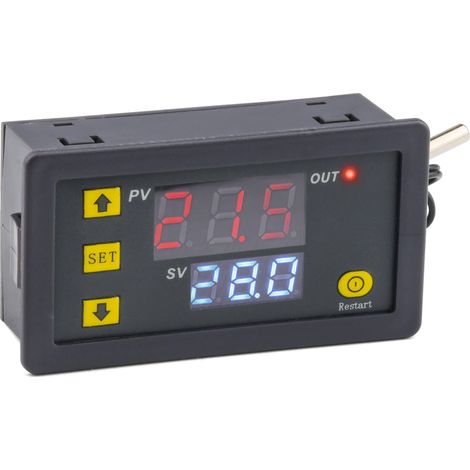
Digital DC 12V Dual LED Display Temperature Controller Sensor Relay Module Thermostat Switch
Sold by A and S
You may also like



Compare with similar items
Product information
Description
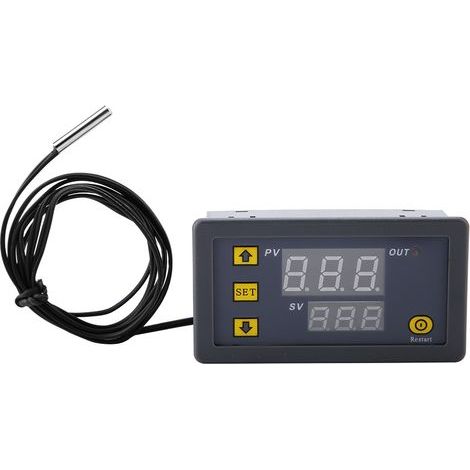
1、This temperature controller is designed with dual-color LED display and has high precision of 0.1℃2、It supports temperature correction, temperature alarm and delayed start function3、Designed with screw terminals for convenient and easy wiring4、Water-resistant probe has higher sensitivity, sealed with silicone, more suitable for liquid temperature detection, safe and durable5、Widely used for temperature control in cabinets, industrial equipment, vegetable and flower greenhouses, etcFeatures:This temperature controller is designed with dual-color LED display and has high precision of 0.1℃.It supports temperature correction, temperature alarm and delayed start function.Designed with screw terminals for convenient and easy wiring.Water-resistant probe has higher sensitivity, sealed with silicone,more suitable for liquid temperature detection, safe and durable.Widely used for temperature control in cabinets, industrial equipment, vegetable and flower greenhouses, etc.Specifications:Control Range-50℃~110℃Control Precision0.1℃Sensor InputNTC10K water-resistant sensor L=0. 5MTemperature Alarm-49℃~110℃Input VoltageDC12VOutput TypeRelay output max. 10AReturn Difference Set0.1~30℃Delay Start0~10minutesTemperature Correction-10℃~+10℃Red DisplayMeasured TemperatureGreen DisplaySetting TemperatureInstruction:K0 K1 Terminal:Thermostat output type is relay output, K0 and K1 is equivalent to a extension relay switch; 12V power supply powers the thermostat, sensor detects temperature, internal temperature control program control relay output and load (if the load is powered by AC power supply, it is safer to connect K0 and K1 to live wire)CodeFunctionSetting RangeDefaultP0Temperature Control ModeH(hot)/C(cold)CP1Return Difference Setting0.1~30℃2℃P2Temperature Correction-10~10℃0℃P3Delay Start0~10 (min.)0P4Temperature Alarm-49~110℃110℃"SET" Button: Set switch"+" Button: Increase temperature"-" Button: Reduce temperatureRestore to Factory Settings: Power on, press and hold "+" and "-" buttons together for about 3 seconds.P0 Temperature Control Mode:This parameter must be set for first time using controller. If used for heating, set it as H; if used for cooling, set it as C.P1 Return Difference:Press and hold SET button to enter internal setting, select P1 setting, press the SET button again to set return difference value. (Return difference value is the value that controller restarts after it reached set temperature and stopped. For example, if we use heating mode, make controller stops at 40℃ and restart at 35℃, the return difference value is 5)P2 Temperature Correction:This function is used for temperature correction, if there is a deviation between measured temperature and real temperature. Correcting Temperature= Measured Temperature + Correction Value.For example, if the measured temperature is 25.6 degrees and the actual temperature is 25.8 degrees, set P4 as 0.2, so the final temperature is 25.6 + 0.2 = 25.8 degreesP3 Delay Start:This function is normally used for compressor refrigeration. If controller is used in refrigerator freezers, this value must be set. According to back pressure of compressor, this value can be set between 3 and 6 minutes. If you don't use it to control compressor or don't need delay function, you can ignore it.P4 Temperature Alarm:Set temperature alarm value, when the real-time temperature exceeds this value, the display will flash to alarm.Heating mode setting example:Control electric heating equipment to stop heating at 35℃, and restart when temperature is down to 30℃;1, Press and hold SET button for 3 seconds to enter internal setting, set P0 as H.2, Press and hold SET button to return to the real-time temperature display, press SET button again and the green display flashes, then adjust the value to 35℃.3, The default return difference is 2, it need to be set as 5 if want to restart at 30℃. Press and hold SET button to enter internal setting, select P1, change P1 value to 5.Cooling mode setting example:Control air conditioning refrigeration to stop cooling at 23℃, and restart when the temperature is up to 27℃;1, Press and hold SET button for 3 seconds to enter internal setting, set P0 as C.2, Press and hold SET button to return to the real-time temperature display, press SET button again and the green display flashes, then adjust the value to 23℃.3, The default return difference is 2, it need to be set as 4 if want to restart at 27℃.Press and hold SET button to enter internal setting, select P1, change P1 value to 4.Package Includes:1 x Temperature Controller
Features
- BrandSTUNACY
- Height10 mm
- Width10 mm
- MaterialSilicone
- Weight100 g
- ManoMano ReferenceME215566982
- MMID420737987068
- Product codeSTYM0512-GS02842
- EAN4970488584544
You are here:
'/%3E%3C/svg%3E)