1/4
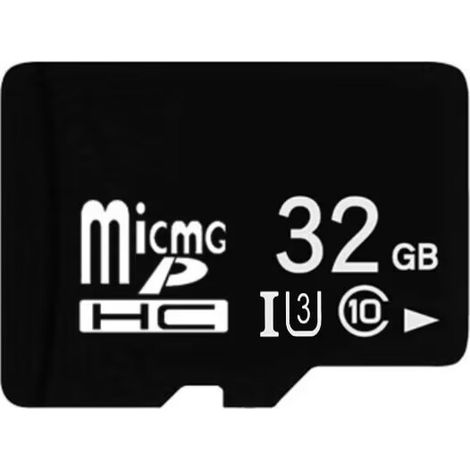
[NEVER USED] 64GB TF Memory Card, High Speed Reading and Writing, Portable Memory Card
Sold by B2C Agro Top Garden GmbH
You may also like











Compare with similar items
Product information
Description
Product never used, packaging damaged during transport. Unopened product, repackaged in our warehouses, in perfect working condition, warranty available.Metal electric chip High-quality metal plating chips and excellent production technology ensure the data stability and data stability of the memory card. High-quality wafer Ensure that the product's writing speed is 10MB/more, allowing your mobile device to run stably High-quality storage wafer Read and write without waiting Common problems are solved as follows: Case 1: Insert the memory card into the computer for recognition. Put it on your phone and it will not be recognized! ! This situation is often caused by formatting the memory card on the computer, but the format is incompatible with the mobile phone. The solution is to put the card back into the phone and use the phone's "Format Memory Card" function to reformat it! ! Situation 2: The phone prompts "Remove the memory card, please press OK" and follow the instructions to remove the card. After a while, you can plug it back into the phone and you can continue to use it. However, after a while, it prompts you to remove the card, and so on! ! This is because the memory card is frequently inserted and removed, which causes the phone's memory card slot to become loose and cause poor contact. You can consider going to customer service to repair your phone, and be careful not to use excessive force when hot swapping cards in the future! Situation 3: The reading and writing speed of the TF card is getting slower and slower, much worse than when I first bought it. It is also a storage device. The TF memory card of a mobile phone is the same as that of a computer. After using it for a period of time, disk fragmentation will occur due to frequent deletion and copying, which will affect the reading and writing speed. However, the format of the hard disk is FAT32 or NTFS, and the TF card of the mobile phone is FAT16. Therefore, a series of errors often occur after the computer defragments the mobile phone, and serious errors occur when the TF card is inserted into the mobile phone. In fact, just copy the hidden files into the TF card, format the card and then copy the files to it!! Situation 4: The phone suddenly asks for the password of the memory card, otherwise it will refuse access, but it has not been set before. Unfortunately, you are very likely to be infected with a mobile phone virus under the S60-CARDBLK system Trojan. This small Trojan will be perfectly disguised as a broken version of the INSTANT.SIS software to spread. When you accidentally run it, it will set a password for your card. This password is randomly generated up to 16 digits, and the cracking is almost 0. If it is poisoned, you can only say goodbye to the small card!!! A: Do not accept any applications or text messages from strangers. Especially things from unknown Bluetooth!! B: Try to download items from trustworthy sites. C: Install professional antivirus software on your phone. Situation 5: The webpage cannot be opened when the memory card is inserted into the mobile phone, but it can be unplugged!! The inability to open webpages or the inability to respond from "Network" may be caused by third-party input methods. Switch back to the original input method and the problem is solved!! Situation 6: I copied a 600MB file to a 1GB TF card. The memory card could not be safely removed from the computer, so I removed it. After the memory card was installed in the phone, the message "The card is damaged" is displayed. If I connected the card to the computer, the computer did not recognize it! If you copy a large capacity of data to a memory card at one time, sometimes deleting the memory card may fail. It is recommended to copy data in batches in the future. If the phone's memory card cannot be recognized by the computer, you can do the following: A: On the computer side, use the computer to format it to FAT16. B: Use the TFMEDIC forced format tool to fix it. C: Format the memory card directly on the phone. Situation 7: When the phone formats the memory card, the message "Memory card is not in use" is displayed, and the problem persists when the phone restarts. Try the following steps: Shut down --- Reinsert the memory card --- Turn on the computer. Situation 8: Many programs on the mobile phone cannot run normally. When the mobile phone is connected to the memory card, it indicates that the memory card does not exist and cannot be connected! This situation is most likely caused by the memory card being renamed, resulting in a program error. Just delete the registry and replace the memory card names in batches in the computer's Notepad!! Situation 9: After the memory card is reformatted, the message "Cannot be used" is displayed. First check whether the format used for formatting is FAT32 format. If it is formatted to FAT16, if the problem persists, you can try to repair it in the computer system's "Disk Utility". Situation 10: The photos and multimedia video files placed in the memory card suddenly disappeared. Connect the memory card to the computer with a card reader, determine its drive letter, open the computer's "Start" menu, select Run, enter "CMD" and press Enter, enter "CHKDSK H:/F" under the MS-DOS command. . Situation 11: Insert the memory card into the card reader. After connecting, the computer freezes but nothing happens. Then there are two situations: A: The computer indicates that the memory card cannot be read. B: I lost patience during this long wait and removed the memory card. The computer showed that the memory card could not be used!!! Check if the card reader is plugged in properly!! If not, change the card reader or format it
Features
- BrandAUTLEAD
- MaterialMetal
- Write speedV10
- ManoMano ReferenceME218850342
- MMID686550978307
- Product codeGMYG20260530-2337
You are here:
'/%3E%3C/svg%3E)