1/4
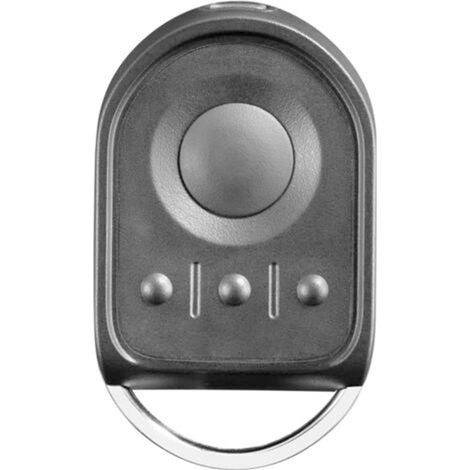
Universal garage door remote control – 4 buttons, 868.3 MHz frequency, 30 m range, compatible with HSM4/HSE2/HS1
Of which environmental contribution £0.10 including VAT.
Buying for your business?
Negotiated prices excl. VAT up to -20%
Sold by Permu UK
You may also like








Compare with similar items
Product information
Description
Helpful tip: This garage door remote is a replacement rather than an original accessory. Please check device compatibility using the following list before purchasing. Compatible only with the following blue 868 MHz remotes: HSE4-868-BS, HSE2-868-BS, HS4-868-BS, HS5-868-BS, HS1-868-BS, HSD1-868-BS, HSD2-868-BS. Two programming methods: Copy the remote's code / Program the original remote via the receiver. Note: Integrated rolling codes (blue LED)! If your original remote uses fixed codes (red LED), this remote will not work. Supports up to 4 garage doors, controls up to 4 garage door openers or motors + rolling code technology for secure access and optimal connectivity to your home. Unique design and durability thanks to high-quality materials such as the reinforced metal housing of the remote. This makes it more robust and attractive than a bulky 100% plastic remote. Mini transmitter with 4 buttons (BS) – with a protective metal cover to prevent accidental presses. It's small enough to be attached to a keychain, pocket, or backpack, making it easy to carry. Note: Integrated rolling codes (blue LED)! If your original remote uses fixed codes (red LED), this remote will not work. Compatible models: For Hörmann HS1-868-BS, HS4-868-BS, HS5-868-BS, HSE1-868-BS, HSE2-868-BS, HSE4-868-BS, HSP4-868-BS, HSD2-868-BS, and HSS4-868-BS. Programming: 1) Press and hold the button on the new remote control. To program the code of the original remote control, keep the button pressed. Then press another button three times until the red LED lights up for 10 seconds. Then release all buttons. 2) Place the original remote control as close as possible to the left of the new remote control. 3) Press the button on the original remote control. Copy the code until the LED flashes alternately red and blue. Check if the LED on the new remote control flashes blue. If not, try moving it as close as possible to the original remote control. 4) Once the blue LED on the new remote control flashes rapidly, the learning process is complete. Release all buttons. 5) Repeat the process for the remaining buttons. Resetting: Assign a new radio code to each button on the remote control by following these steps: (1) Remove the battery for 10 seconds. (2) Press and hold a button on the remote control. (3) Reinsert the battery. The LED will flash blue slowly for 4 seconds. Then, the LED will flash blue rapidly for 2 seconds. After that, the LED will glow solid blue. (4) As soon as you release the button on the remote control, all radio codes will be reassigned. Note: If the button on the remote control is released too soon, no new radio codes will be assigned.
Features
- BrandOTHERS
- ColourBlack
- Pcs per pack1
- Light colourBlue
- SmartYes
- Weight135 g
- Range3000 cm
- Motorisation accessory typeRemote-control
- Motorization useGarage
- ManoMano ReferenceME212498147
- MMID521371652857
- Product codeXHWD-MU-YY00489
- EAN6218002568013
You are here:
'/%3E%3C/svg%3E)