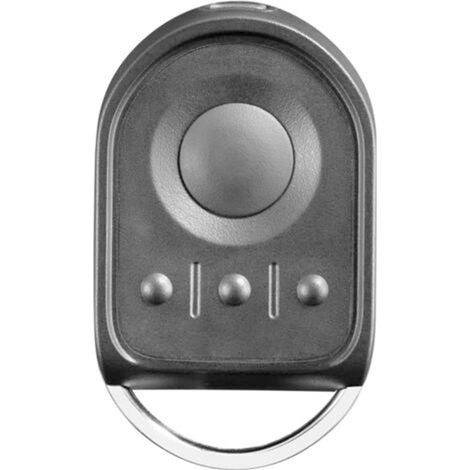
CAME TOP432NA remote control
Buying for your business?
Negotiated prices excl. VAT up to -20%
Sold by AINSCO
You may also like







Compare with similar items
Product information
Description
Replacing the CAME TOP432NA Remote Control: The TOP432NA remote control is obsolete and production has ceased. The manufacturer now offers a newer model, the CAME TOP432EE, which is 100% compatible with the TOP432NA. The TOP432EE remote control is now the only model available. Click here to discover the new CAME TOP432EE remote control that replaces the CAME TOP432NA. Description of the CAME TOP432NA Remote Control: The Came TOP432NA remote control is a control device for remotely operating automated gate and garage door openers. The Came remote control, model number TOP432 NA, is available in gray. It has two gray buttons and operates on a radio frequency of 433.92 MHz. The CAME TOP 432NA gate remote control is considered the most widely used control device in France. It offers great convenience and ease of opening and closing your motorized gate or garage door. This high-quality accessory features a robust and stylish casing and boasts excellent performance. The remote from Came, the leading home automation brand, is easily programmed via self-learning from a previously programmed remote or directly from the receiver. A programming guide will be included with your new remote. 1001remotes, a specialist in France for the sale of parts and remote controls, both individually and in kits, stocks remote controls from leading brands such as Bft, Nice, Cardin, Somfy, and others. Additional information: Do not confuse the TOP432NA remote control with the similar-looking Came TOP862NA remote control with black buttons. These two models are not compatible as they use different frequencies. "NA" is the reference for the new version, replacing the old "SA" reference. If you are unsure which transmitter to choose, please don't hesitate to contact our advisors, who are available to answer your questions at any time. Details on the CAME TOP432NA remote control: A CAME gate remote control offers you the opportunity to simplify your daily life and enhance the security of your home. A Came remote is the best choice for your motorized or automatic gate. This gate remote is suitable for use in multi-family dwellings and operates on a 433MHz frequency to control motors that operate on the same frequency. This remote requires two CR2016 batteries to function. The remote uses two channels and allows you to control a gate and a garage door. The transmitter offers a long operating range of over 100 meters. The Came Top 432 NA transmitter has been replaced by a new model, the TOP432EV, which is black. Came's TOP range remote controls use a rolling code system to enhance the security of your property. The code changes with each press, making it impossible to clone or copy. Programming is easy and requires no special equipment; it's done automatically via a pre-programmed remote or the receiver. The remote comes with programming instructions to simplify the process! The TOP432NA remote control is compatible with the following CAME TOP radio receivers: CAME AF43S (plugs into CAME electronics) CAME RBE 432 (external, can be connected to any gate automation electronic board) Remote controls that can be replaced by the CAME TOP432NA remote control: CAME TOP 432SA CAME TOP 432A CAME TOP 434A CAME TOP 432EV CAME TOP 432M Remote controls compatible with the CAME TOP432NA remote control: CAME TOP 432S CAME TOP 432EE CAME TOP 434M TOP TOP 434MA (older version of the 434NA) Learn more The advantage of using a gate remote control is being able to combine comfort and security. But before purchasing any product, you should choose your transmitter carefully to ensure compatibility with your receiver. First, consider the brand and model number of your transmitter. Next, pay close attention to the transmission frequency, as it's a major compatibility factor. You should also check the number and color of the buttons on your remote, as these are often related to the frequency. Last but not least, consider the coding type of your remote. Programming steps for your CAME TOP432NA remote: Caution: During the coding process, pressing the buttons on an already programmed remote first may unprogram it. Programming from an already programmed remote: Press and hold the two top buttons on your new T1 remote simultaneously. The LED on your new remote will flash slowly, then more rapidly. Release the buttons; the LED will continue to flash. Proceed to the next step before the LED goes out. While the LED is flashing, press the button you want to program on your new remote control T1. Release it. The LED on your new remote control will remain lit. Place your already programmed remote control T2 and your new remote control T1 so they are touching, as shown in the figure above. On your already programmed remote control T2, press the button corresponding to the button you want to program, while the LED on your new remote control T1 is lit steadily, until the LED on your new remote control T1 flashes three times. If the LED on your new remote control T1 goes out before you press the button on your already programmed remote control T2, start over from step 1. Your new remote control is now programmed. This process must be repeated for each button you want to program. Programming from the receiver (if you don't have a pre-programmed remote control): Open the receiver box, which is located near your motor. On the receiver board, press the CH1 button. While holding down the CH1 button, press the first button on your new remote control. Release the buttons. On the receiver board, press the CH2 button. While holding down the CH2 button, press the second button on your new remote control. Release the buttons. Your new remote control is now programmed.
Features
- BrandSANS MARQUE
- ColourGrey
- Motorization compatibilityYes
- MaterialPlastic
- Motorisation accessory typeRemote-control
- Remote control typeRadio
- Motorization useFor gate
- ManoMano ReferenceME228786491
- MMID586638211815
- Product codeBESTone-00036
You are here:
'/%3E%3C/svg%3E)