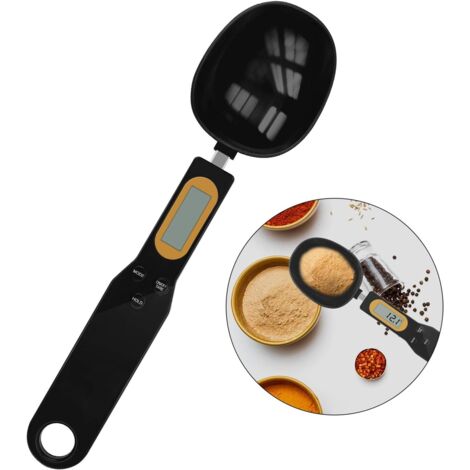
Digital Spoon Scale Household Portable Stainless Steel Kitchen Baking Scale for Flour Tea Spices 500g/0.1gRed
You may also like









Compare with similar items
Product information
Description
1、Reading Lock: It has tare weight, unit switching and reading functions. After the data is stable, the reading will be automatically locked.
2、Unit Conversion: Spoon scale has a weight unit conversion function to meet your different needs, including g, ct, dwt, ozt, gn, t, oz.
3、Energy Saving: According to whether it is used frequently, it can be used for 1 to 2 months or even longer after installing the battery.
4、Good Material: Made of stainless steel and eco friendly ABS plastic material, spoon is strong and not easy to break, durable for use.
5、Scope Of Application: It is very suitable for weighing flour, butter, cream, tea or spices during baking. Suitable for your kitchen and daily diet. 6、LCD Display: Low power overload alarm indication. Large LCD display, easy to measure and observe data, practical for use.
Item Type: Digital Spoon Scale
Material: Stainless Steel+ABS Plastic
Weight: 115g / 4.1oz(approx.)
Host Size: Approx. 13 x 2.3cm / 5.1 x 0.9in
Battery: 2 x AAA batteries (Not Included)
Product Accessories: Measuring spoon 30ML x 1+80ML x 1+main body
Unit: G, ct, dwt, ozt, gn, t, oz
100g/0.01 -500g/0.1g; minimum weight: 0.05g;
0.01g graduation value below 100g; 0.1g graduation value above 100g.
500.9g shows FULL overload.
How to Use:
1. Open the battery cover, insert the battery as shown in the figure, close the battery cover, select the appropriate measuring spoon and insert it into the scale body, pull out the measuring spoon when it needs to be replaced, and reinsert it. After placing the scale on a windless platform, press the key to display 88888.
2. Unit blanking function
After selecting and long pressing the unit conversion key for 4 seconds will light up all the units, the CT unit will flash, press TARE to select retention or blanking, and press the UNIT key to shifts to select the unit that needs to be blanked. Long press the UNIT key for 4 seconds to return to the normal weighing mode. Press the UNIT key again to confirm the blanking success.
This function is for guests from different countries to choose common units, so as not to often need to choose. The g unit cannot be concealed.
3. TARE (Tare key)
Press this key in weighing mode to force reset to zero. Usage scenario: LCD does not display 0.00 after power on, press this key at this time to force reset to zero.
4. There are items in the measuring spoon, ingredients need to be added, and the weight of the added items needs to be known. At this time, press the TARE button to reset to zero. Then add the item, the weight of the newly added item is displayed at this time.
5. UNIT (Unit Conversion Key)
After turning on to zero, you can press the UNIT key to select the unit to be used (G, CT, DWT, OZT, GN, T, OZ), and you can also select the display of different units during the weighing process.
1 x Large Spoon
1 x Small Spoon
1 x Host (Battery Is Not Included)
1 x English Manual
Features
- BrandSTUNACY
- Length16 cm
- Width15 cm
- Height3 cm
- MaterialStainless steel
'/%3E%3C/svg%3E)