









MManoMano Customer
Published on 23/08/2024no instructions in French. operation is ok
Buying for your business?
Negotiated prices excl. VAT up to -20%


no instructions in French. operation is ok
Alright
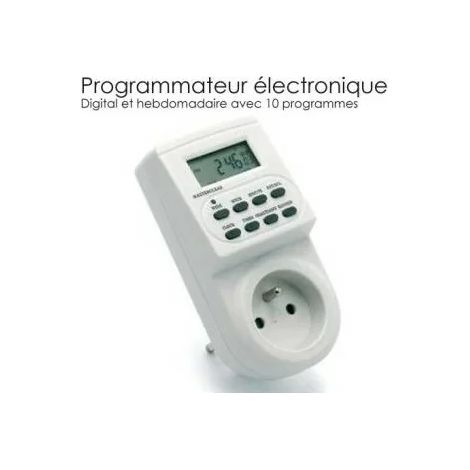
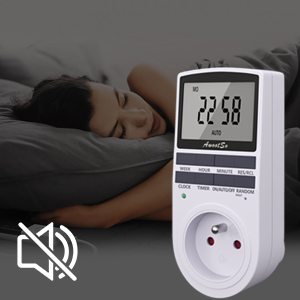
It performs as expected. Although the screen and buttons have been translated into French, the instruction manual is incomprehensible. It took me a whole day to discover all its functions. I wrote a more suitable manual: Houhence 220V Plug-in Timer Of German design, the product has been adapted for French use: French plugs, French text on the screen and buttons. A built-in rechargeable battery saves the settings. 1) Overview On the back: French standard plug (male) for connecting to the mains. On the front: a French standard socket (female) for connecting a device, a screen, and 8 buttons. Below the buttons on the right, a small hole for inserting a metal pin (included) and marked RESET. Below the buttons on the left, an LED indicator shows that the connection is made between the input plug and the output socket. 2) Operation The screen displays the current time (day, hours, and minutes). If the 12-hour display option is activated, "EVENING" or "MORNING" is displayed on the left. Above the time is the day of the week. Below is the indication "ON," "AUTO," or "OFF." To the right of the time is the indication "RANDOM." The four top buttons, as well as the CLOCK button, have no individual function. The TIMER button provides access to the programs (see below). The ON/AUTO/OFF button provides access to these three functions. In ON mode, the contact between the input and output is locked (the LED only lights up if the timer is connected); in OFF mode, this contact is broken; in AUTO mode, the timer manages the timer according to the programmed settings. The RANDOM button provides access to a function that closes the contact at specific times and for indefinite durations (this simulates occupancy). 3) Setting the Time This is the first thing to do upon receiving your timer. Plug your timer into a power outlet. It takes 15 minutes to fully charge the battery. To continue, you can unplug the timer. Press the CLOCK and TIMER buttons simultaneously to select 12-hour or 24-hour mode. In 12-hour mode, the screen also displays "MORNING" or "EVENING" on the left. Press the CLOCK and WEEK buttons simultaneously to set the day at the top of the screen. In addition to the 7 days, identified by two letters, the timer offers day combinations. In this case, simply program the hour and minutes. Press the CLOCK and HOUR buttons simultaneously to set the hour on the screen. Press the CLOCK and MINUTES buttons simultaneously to set the minutes on the screen. 4) Programming There are 10 programs available, which can be viewed by pressing the TIMER button. Each program has two successive screens corresponding to the start and stop times. The first screen indicates the day and time of the start: "START," and the second the day and time of the end: "OFF." By continuing to press the TIMER button, step by step, you can scroll through all the program steps. If no time is displayed ("--:--"), that step is not programmed. To program a step, simply enter the day (WEEK button), then the hour (HOUR button), and the minutes (MINUTES button). Be sure to check that you are programming the start or end time for the correct day. At the end of programming, remember to return to clock mode. To cancel a program step, press the RES/REC button. Therefore, you must cancel two steps to delete a program. Caution: If you do not want this program to run the following week, you must cancel it (start and end times) after use. 5) Random Mode This function is activated by the RANDOM button and displayed on the right side of the screen. It will only activate if it is enabled, the timer is set to AUTO, and it is part of a programmed timer. It can be delayed by up to 30 minutes. Example: If you want to program a random timer to run on a Thursday between 9:00 PM and 11:00 PM, you must: - Check that your timer is set to the correct time; if not, correct it. - Program a schedule (No. 1 to 10) with a start time of 8:30 PM and an end time of 11:30 PM. - Press the RANDOM button. 6) Electrical Specifications Operating Voltage: 230 VAC Battery: NiMH 1.2 V Power Consumption: < 0.9 W Response Time: 1 Minute Output Power: 230VAC / 16A / 3680W
1 person found this helpfulGreat for programming outdoor lighting
'/%3E%3C/svg%3E)
The DIY, home and garden specialist
Reliable delivery
Flexible payment options
More than 7 million individual and professional customers