1/5
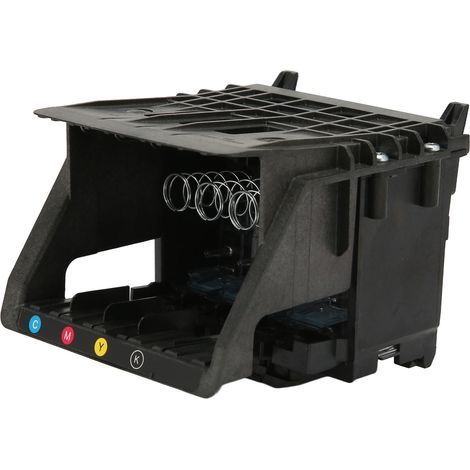
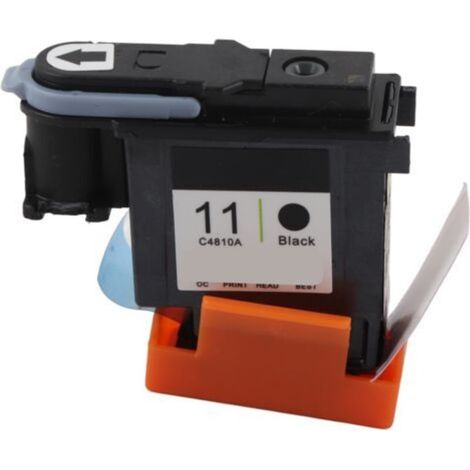
Simple printhead replacement. Rigorously tested, durable black printing. Easy replaceable printer supplies for MG6320, MG6350, MG6380, and MG7120
Recommended Price
Recommended retail price from the manufacturer and provided by the seller.
Buying for your business?
Negotiated prices excl. VAT up to -20%
Sold by Qiudie-homelavafans
You may also like

Compare with similar items
Product information
Description
Features:1.EFFECTIVE PROTECTION: The printhead replacement is equipped with a protective cover to prevent damage to the internal structure.
2.SCOPE OF APPLICATION: For MG6310, MG6320, MG6350, MG6380, MG7120, MG7150, IP7110, MG7180, MG7520, IP8720, IP8750, IP8780
3.Rigorous Testing: Each printhead is rigorously tested, and its performance is assessed using test printing paper.
4. Convenient and practical: This single black printhead can replace the original printhead for easy printing of black images, photos, and documents.
5.HOW TO USE: Please ensure the printer is functioning normally before installation; otherwise, the main board may be damaged, and printing will be refused.The print head must use appropriate inks, and dye inks and pigment inks cannot be mixed
Material: ABS
Model: QY6-0083
Function: Printer Printhead
Suitable for: For MG6310, for MG6320, for MG6350, for MG6380, for MG7120, for MG7150, for IP7110, for MG7180, for MG7520, for IP8720, for IP8750, for IP8780
Package List:1 x Printhead Replacement
2.SCOPE OF APPLICATION: For MG6310, MG6320, MG6350, MG6380, MG7120, MG7150, IP7110, MG7180, MG7520, IP8720, IP8750, IP8780
3.Rigorous Testing: Each printhead is rigorously tested, and its performance is assessed using test printing paper.
4. Convenient and practical: This single black printhead can replace the original printhead for easy printing of black images, photos, and documents.
5.HOW TO USE: Please ensure the printer is functioning normally before installation; otherwise, the main board may be damaged, and printing will be refused.The print head must use appropriate inks, and dye inks and pigment inks cannot be mixed
Specifications:
Item Type: Printhead ReplacementMaterial: ABS
Model: QY6-0083
Function: Printer Printhead
Suitable for: For MG6310, for MG6320, for MG6350, for MG6380, for MG7120, for MG7150, for IP7110, for MG7180, for MG7520, for IP8720, for IP8750, for IP8780
How use:
1. Clean the cartridges and print heads: Remove the cartridge and printhead from the printer and clean the metal contacts on the cartridge and printhead with cleaning paper or a cotton swab. Be careful not to use water or chemicals to clean them, as this will damage the cartridge and printhead. 2. Replace the cartridge and printhead: If the problem persists after cleaning the cartridge and printhead, you may need to replace them. Make sure you use the correct model and specifications of cartridges and printheads to avoid incompatibility issues. 3. Reset the printer: Sometimes, resetting the printer can resolve the issue. Press the printer's power button to turn it off. Then wait approximately 5 minutes and press the power button again to turn it back on. This may clear the error message from the printer. 4. Update the printer driver: Using an outdated printer driver can cause a B203 error on your printer. Please try downloading and installing the latest printer driver from the official Canon website.Package List:1 x Printhead Replacement
Features
- BrandOTHERS
- Pcs per pack1
- ColourBlack
- MaterialAcrylonitrile butadiene styrene (ABS)
- Printer accessory typeConsumables
- Compatible printer typeToner
- ManoMano ReferenceME242421694
- MMID668668628853
- Product codeQD-GB26Y57516
- EAN5002098275068
You are here:
'/%3E%3C/svg%3E)