1/5
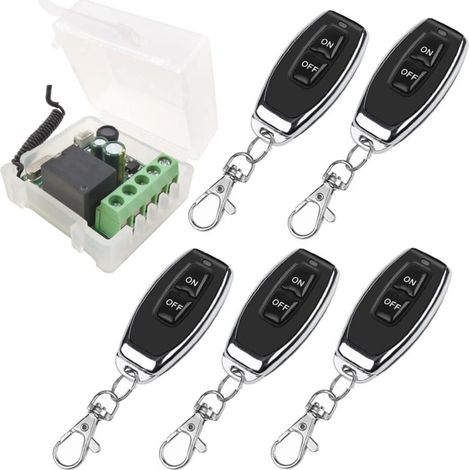
Single-channel learning type remote control relay switch with 2 buttons, DC 12V
Buying for your business?
Negotiated prices excl. VAT up to -20%
Sold by APD Funding
You may also like












Compare with similar items
Product information
Description
Features: 1. This relay remote control is lightweight and convenient, with an ultra-small body and compact size. 2. By learning the pairing code, it can be used with any remote control operating on the same frequency. 3. The signal can penetrate walls, floors, and doors, allowing for stable control of the receiver from anywhere within a reliable distance. 4. It supports wireless remote control of devices, and the two-button design allows for more precise operation. 5. High-quality ABS material provides a hard shell for the Relay remote control, making it difficult to break. Specifications: Item Type: Relay Remote Switch Material: ABS Working Voltage: DC12V Static Working Current: ≤10mA Working Temperature: -40℃ - +80℃ Receiving Sensitivity: ≥-95dB Working Frequency: 433.92MHz Output (AC and DC controllable) Remote Control: Buttons: 2 buttons Working Frequency: 433MHz Application Scope: Widely used in many household or industrial circuits and electronic products. To reset the controller, turn it on, then clear the code. After pressing the learning button on the control panel 8 times consecutively, all remote controls that have learned the code will be automatically cleared. After clearing, the remote control that previously learned the code will no longer be controlled. Code pairing methods: 1. Jog method: Press the pairing button on the control panel once. The LED indicator will flash once. Once the LED indicator lights up, press the remote control button to be paired. The LED indicator on the control panel will flash three times consecutively. Code pairing is successful. 2. Automatic learning method: Press the code matching button on the control panel twice. The LED indicator will flash twice. Once the LED indicator lights up, press the remote control button to be coded. The LED indicator on the control panel will flash three times consecutively. 3. Interleaving method: Press the pairing button on the control panel three times. The LED indicator will flash three times. Once the LED indicator lights up, press the remote control button to be paired, and the control panel LED indicator will flash 3 times continuously. 4. Learning method with a 5-second delay: Press the code matching button on the control panel 4 times; the LED indicator will flash 4 times. Once the LED indicator lights up, press the remote control button to be coded, and the control panel LED indicator will flash 3 times consecutively. The code has been successfully matched. 5. Learning method with a 10-second delay: Press the pairing button on the control panel 5 times consecutively, and the LED indicator will flash 5 times. Once the LED indicator lights up, press the remote control button to be paired. The control panel LED indicator will flash 3 times consecutively, and the code has been successfully matched. 6. Learning Method with a 15-Second Delay: Press the button corresponding to the code on the control panel 6 times consecutively, and the LED indicator will flash 6 times. Once the LED indicator is lit, press the remote control button that needs to be coded, and the LED indicator on the control panel will flash 3 times consecutively. To change the mode, please clear the data: After pressing the learning button on the control panel 8 times consecutively, all remote controllers that have learned the code will be automatically cleared. After clearing, the remote control that has already learned the code will no longer be controlled. Package List: 1 x Receiver, 1 x Transmitter, 1 x Output Box
Features
- BrandBIEMMEDUE
- MaterialAcrylonitrile butadiene styrene (ABS)
- Wireless communication protocolRF 433/868 MHz
- Voltage12 V
- Type of home automation accessoryRemote-control
- Type of electronic componentChangeover switch
- ManoMano ReferenceME236414359
- MMID361990174451
- Product code6YLYG20260813-4671
You are here:
'/%3E%3C/svg%3E)